Grocery list meets meal plan
Recipes to shopping list, sorted by aisle.
Recipes to shopping list, sorted by aisle.

Items sort themselves into store sections, each with its own illustration, and your meal plan sits right on top.


Type a few letters and Handla suggests what you mean, learning the things you buy most.


Paste a link to a recipe page, an Instagram Reel or a TikTok, and Handla saves it with its ingredients.


Add a recipe and its ingredients go straight onto your list, scaled to how many you cook for.


Spot a recipe in Instagram or TikTok? Share it to Handla right from the app and it joins your recipes.


Groceries, the pharmacy, the summer house. Give each list its own name, color and icon.


Choose from dozens of colors and icons for your lists, and an app icon to match.


Keep a list or your meal plan on the Home Screen, and the next meal on your Lock Screen.


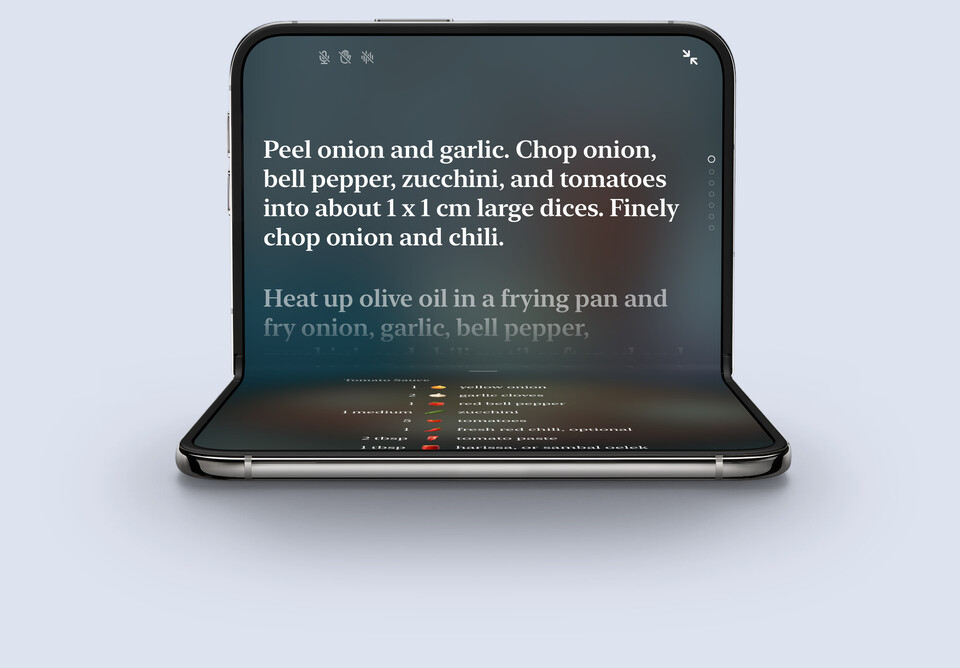
Full-screen cooking with timers in every step. It reads steps aloud and turns the page when you raise a hand.

Unfold it for the big display. Fold it on a recipe and you’re cooking.
Handla is a grocery shopping list app for iPhone, iPad and iPhone Duo. Type a few letters, pick a suggestion, and the item lands in the right section of the store with its own illustration. Check things off as you shop and the list gets shorter as you walk.
When you know what you’re cooking, add the recipe instead. Its ingredients go onto your list, and the recipe waits there as your meal plan, with timers built into its steps for when you start cooking.
Handla is free to download and use for a list of up to ten items. Handla Premium, an in-app subscription with a 7-day free trial, removes the limit and adds as many lists as you like and unlimited saved recipes. The price is always shown in the app before you commit, and you can cancel anytime.
Every item you add goes into its store section, such as Produce, Dairy or Bakery, so you walk the store once instead of zigzagging. You can drag the sections into the order of your own store.
Yes. Send a list as text to anyone, in Messages, Mail or any other app, or print it. Recipes and whole meal plans can be shared as a link, and printed with or without photos to save on ink. Sharing sends a copy, so it doesn’t keep a list in sync between people.
Yes. Add a recipe to a list and its ingredients go straight onto it, sorted into store sections and scaled to the number of people you cook for. The recipe stays on the list as your meal plan, ready when it’s time to cook.
Yes. Paste a link to a recipe page, an Instagram Reel or a TikTok, or share it to Handla from Safari or the app, and Handla saves the recipe with its ingredients and steps.
Yes. Full-screen cooking mode can read each step aloud, listens for commands like “next step”, and turns the page when you raise your hand. Timers are built into the steps, so starting one is a single tap.
Yes. Put a list or your meal plan on the Home Screen, and keep the next meal or a list’s count on the Lock Screen.
Yes. Handla is made for iPhone, iPad and iPhone Duo. Unfold the Duo and your lists fill the big screen, with an optional sidebar and a card layout made for the extra space.
English, Swedish, Danish, German, Spanish, Finnish, French, Icelandic, Japanese, Norwegian and Dutch, grocery names included.
No. Handla is an app for iPhone and iPad.
Write to us at hello@filibaba.com, or have a look at Support. We read everything.